
Background and history
I’ve been drooling over this headset for a long time, to be honest. Even though I don’t define myself as a… hifiman, I’ve cared about music, speakers, headsets and good sound my whole life. I’ve tested countless sound cards and experimented with headsets and sound for a long time. For gaming and music I’ve used the open studio headset Beyerdynamic DT 990 since around 2017, and it still hangs under my desk ready for use, and has been my reference headset next to the ASUS ROG Kithara. I’ve also used a closed HIFIMAN headset as a test headset.
At the same time, gamer gear has annoyed me for a long time too. It has long been all loud design, RGB, cheap plastic and a tiring sound. Designed precisely to lure young consumers into spending their pocket money or confirmation money. It’s as if the manufacturers haven’t understood that there are a lot of adults with money who game, and who care about gaming. Adult gamers are exactly the group with money that you should reach with your products. Luckily this has changed in recent years.
That is the reason many of us have drifted towards products that aren’t directly branded as gaming accessories, like studio headsets, podcast microphones and gear that’s really aimed at a completely different crowd.
So I was very excited when I saw that ASUS and HIFIMAN had announced a collaboration. In October I got to try it on my head for the first time, but then I got to neither listen to it nor test the microphone. Now however, dear reader, I’ve borrowed a test unit from ASUS, and used it at home and at work, for gaming and music, for about a month and a half.
Hifi disguised as gaming
Like I said, I’m not usually in the target group for ASUS ROG, with their aggressive styling and overdesign. It’s a bit like Xzibit with three flat screens in the back of the pickup, as an acquaintance described it.
I, on the other hand, am a much bigger fan of traditional hifi, with less angry branding and materials like wood or aluminium. My other HIFIMAN headset, the HE-R10, is an example of that. It uses what appear to be premium materials.
The ASUS ROG Kithara lands somewhere in between. It combines very good materials with the ASUS branding, and I’ve ended up accepting the branding.
Top build quality
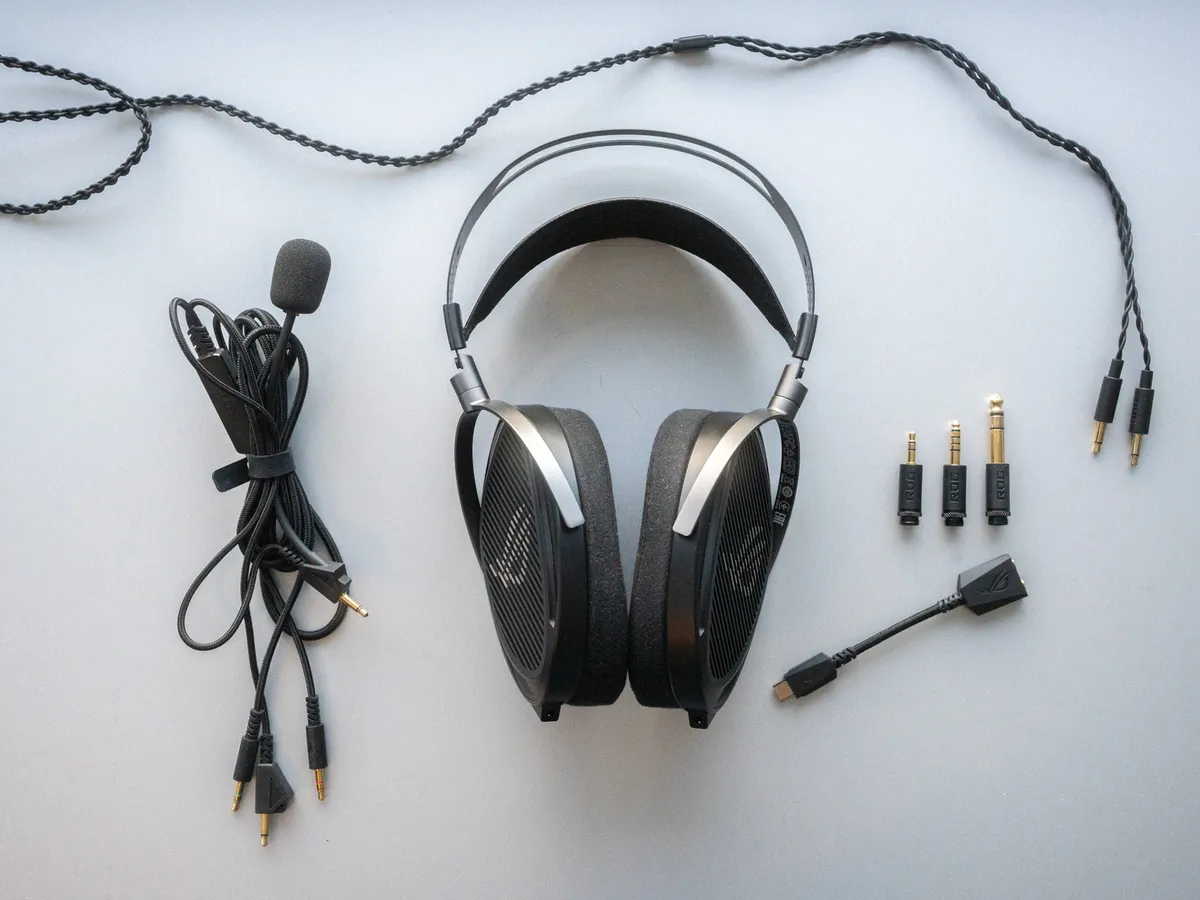
The first thing that strikes me when I open the box is that nothing has been skimped on here. This feels exclusive and of very good quality. In the package you first get a transparent sheet that describes all the parts that are included. You also get a kind of seal of calibration that sort of shows it’s factory tuned, even though it turns out this is a generic sound signature and not exactly tested on this headset, once you dig deeper into the documentation.
Then you see the three different jacks. Baby bear at 3.5 mm, mama bear at 4.4 mm and papa bear at 6.3 mm. I don’t think I’ve ever seen mama bear before!
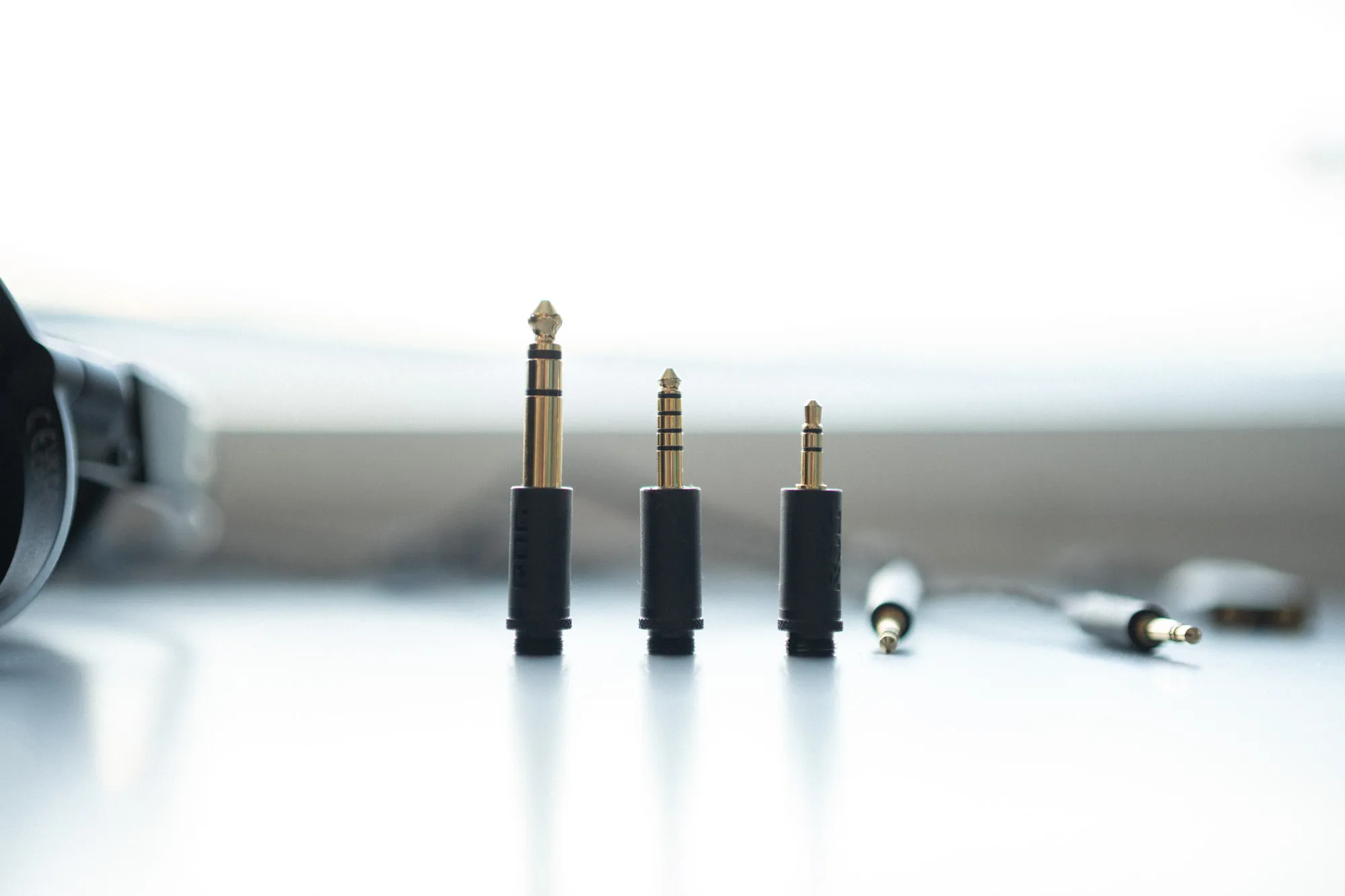 Papa bear, mama bear and baby bear: 6.3, 4.4 and 3.5 mm. / Credit: kaytomas.com
You also get two different cables. A twisted plastic cable with a left and right plug in one end, and a detachable jack in the other. Each ear cup has its own cable connection marked L and R, together with a notch that makes sure the plug goes in the right way (important for the microphone).
The other cable has a mounted microphone that sits on the left side, and ends in two 3.5 mm jacks, one for mic and one for headset. These are the ones marked with green and pink on the back of your motherboard, if you’re familiar with that. These two plug into the USB-C adapter if you want to go for that solution. In the documentation ASUS writes that they chose not to go for a combo jack, meaning both mic and headset in a single 3.5 mm jack, to avoid the sound from the headset bleeding into the microphone.
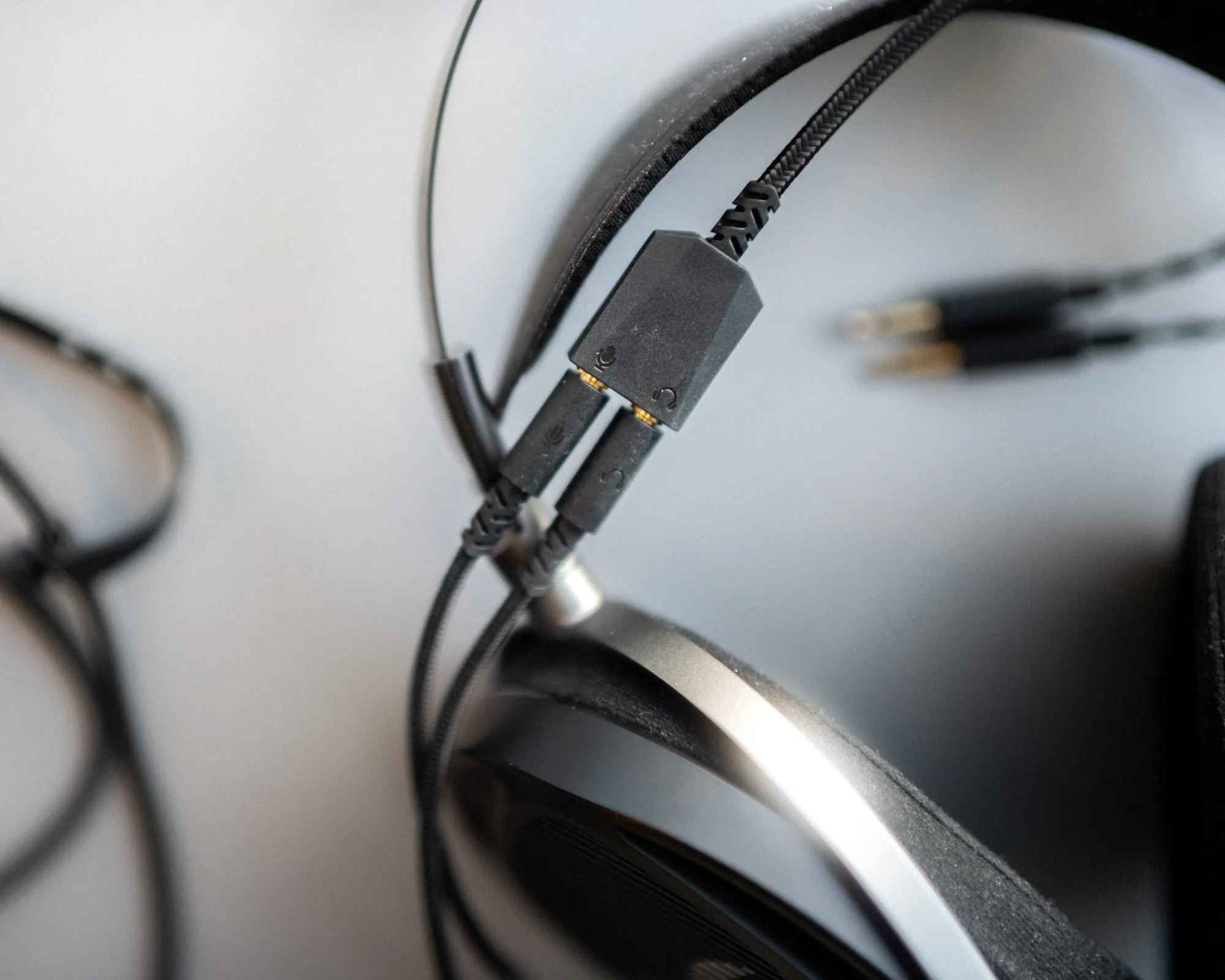 Microphone and sound each go in their own 3.5 mm plug, not in a combo jack. / Credit: kaytomas.com
Then I find the headset itself. It’s built like a German tank, or, I don’t know if the Germans’ tanks were of such good quality. This is, at least. It oozes quality, with a frame on top that takes the load off your head, and the ear cup itself is of very good quality in what I assume is CNC-milled aluminium. It screams quality.
In the box you get a very good selection of cables. You can run it as a pure stereo headset, and you get a cable for that. Or you use the other cable, which you can connect the microphone to. It’s braided, and right by your chest sits a simple control for volume up, volume down and mute. Simple, but a good enough implementation.
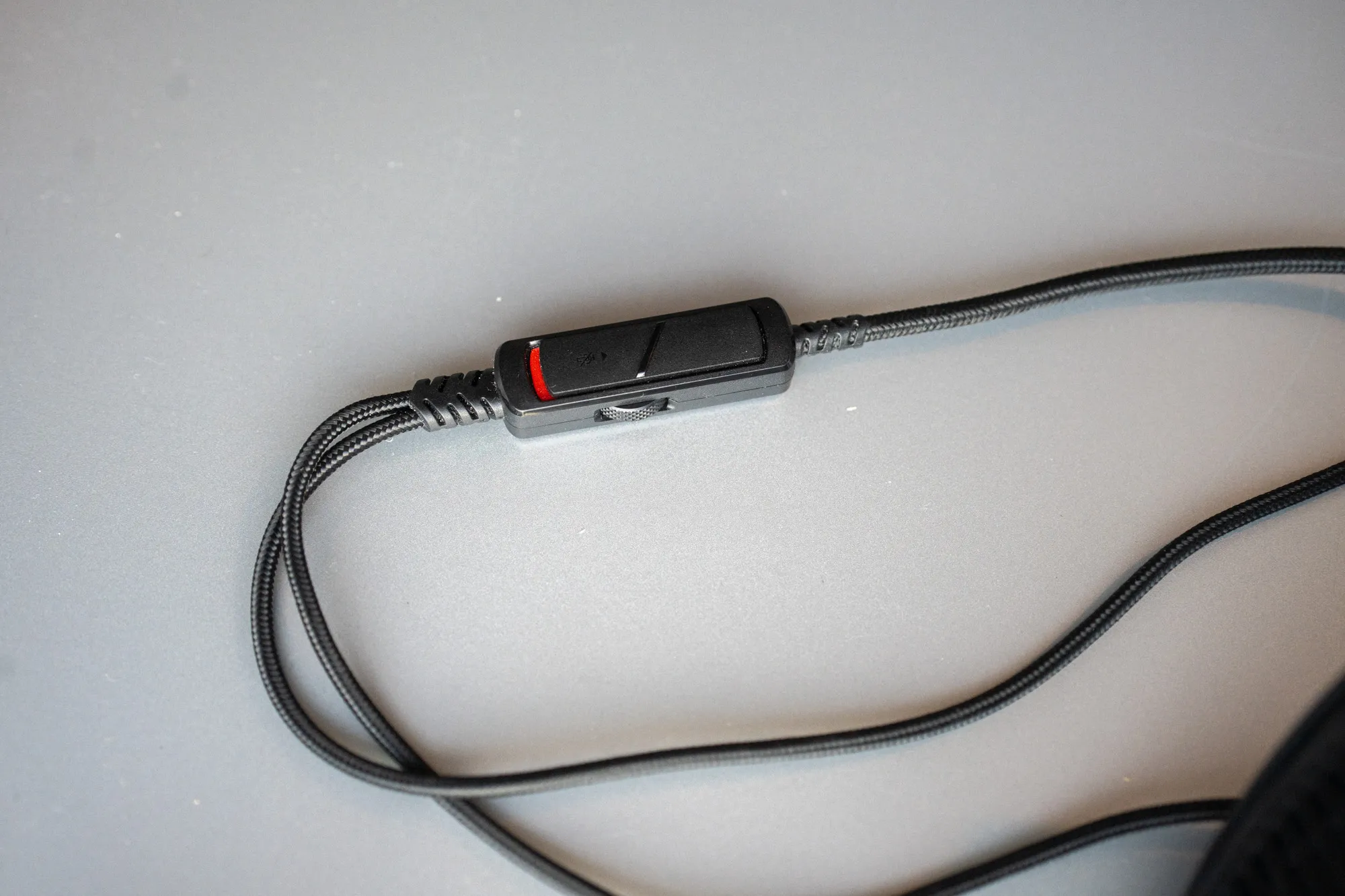 The control on the braided cable. / Credit: kaytomas.com
That cable also comes with a USB-C to 3.5 mm adapter. It works as a tiny external sound card that you just plug in. You can also plug the 3.5 mm jack straight into the machine.
A pair of faux leather pads comes mounted, and there’s also a pair of velour pads lying under the packaging in the box. I’ve tested both, but I know from experience that I like velour best, so about halfway through the test period I switched to them.
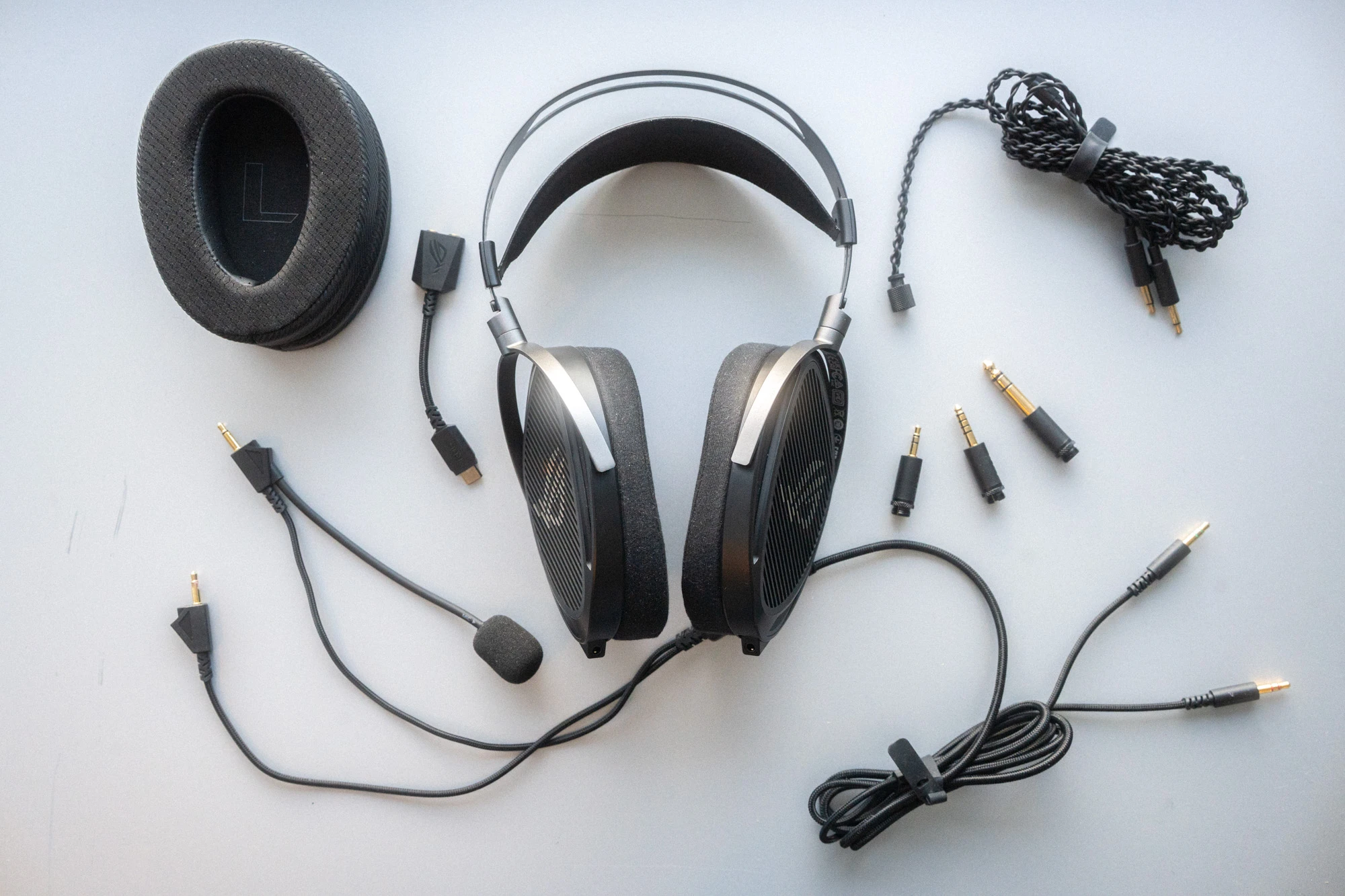
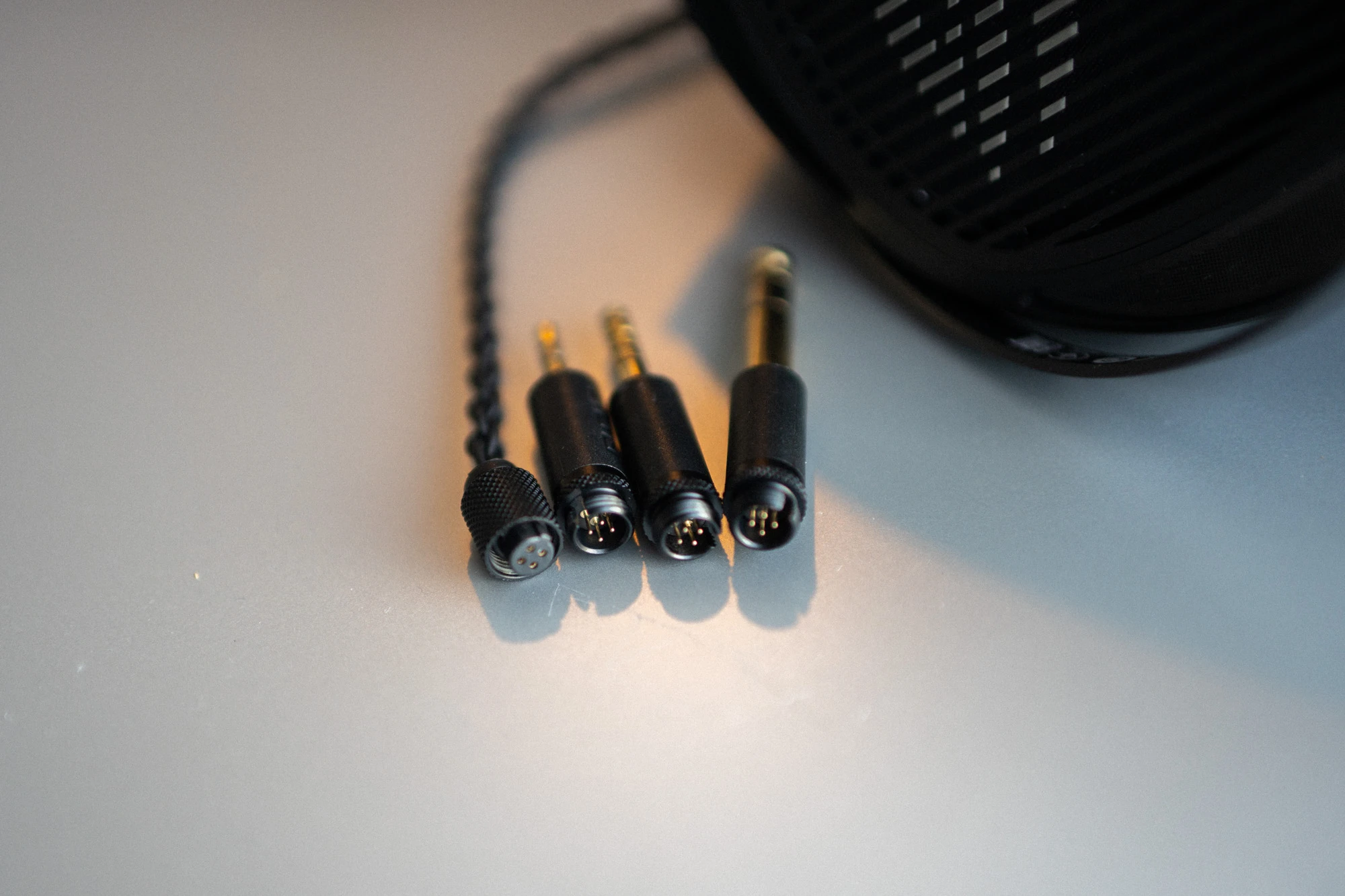
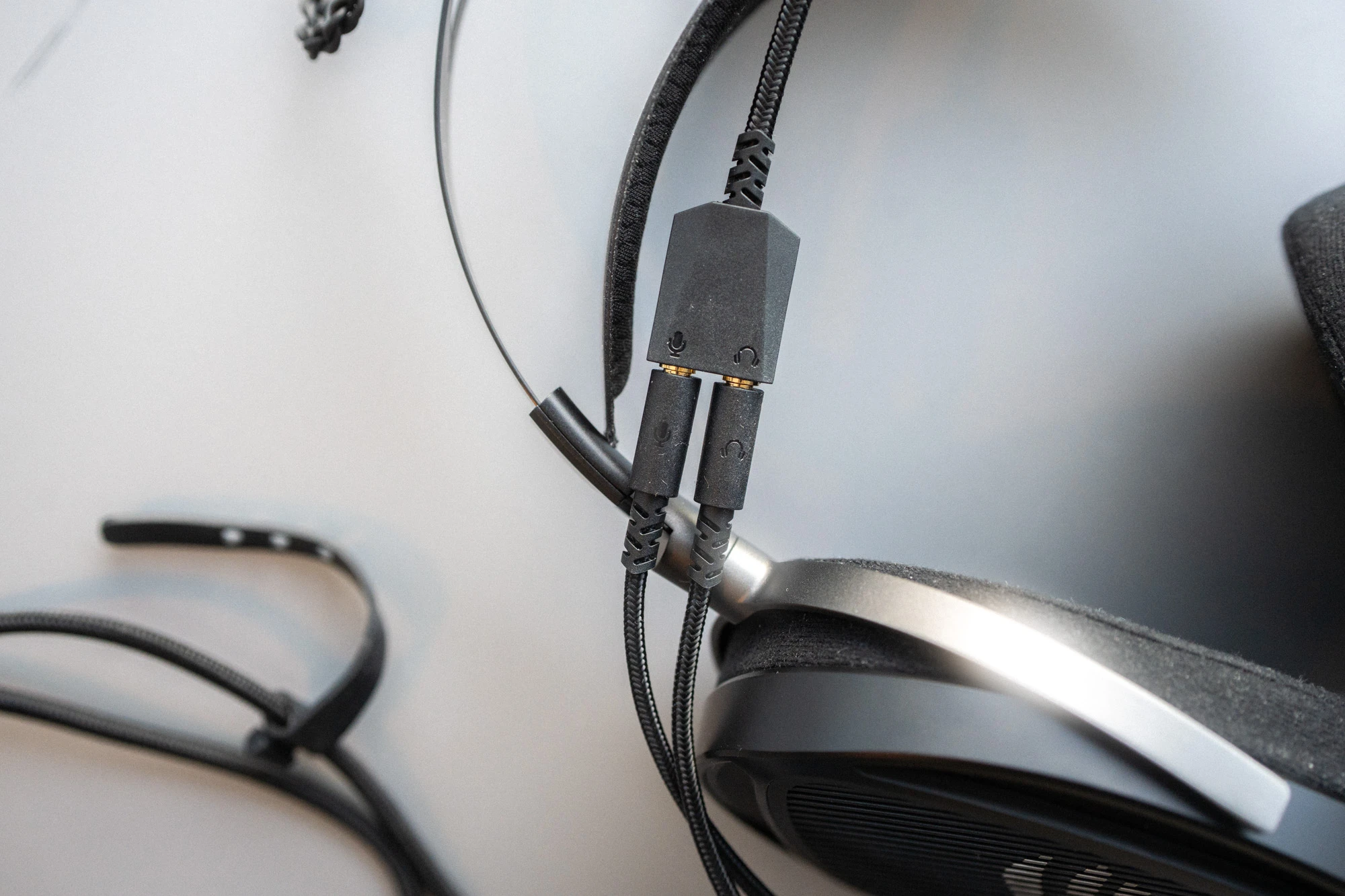
The velour pads next to the rest of the accessories, the screw connectors on the jack adapters and the USB-C adapter with both plugs in. / Credit: kaytomas.com
Planar drivers, what on earth are those?
The first time I ran into this term was while researching my other HIFIMAN headset, the HE-R10.
You can think of a headphone as a tiny speaker that moves air. The air that gets moved is the sound you hear. The difference lies in how it moves the air. With regular headphones there’s a small motor that moves a membrane. With planar magnetic drivers there’s a super thin, flat film with electrical traces across large parts of the surface. Magnets and current then make the film move. This is supposed to give good control over the movements and less chance of distortion.
Does this mean that traditional headsets are bad? Of course not. But it’s a different technology that’s used here, which HIFIMAN probably chooses to use both because it’s good, and because it sets them a bit apart in the market. It sounds very fancy, and my thinking is that a good headset is a good headset no matter how it’s built.
Inside the Kithara sits a pair of ROG-tuned planar drivers of a whole 100 mm, supplied by HIFIMAN. 10 cm in diameter!
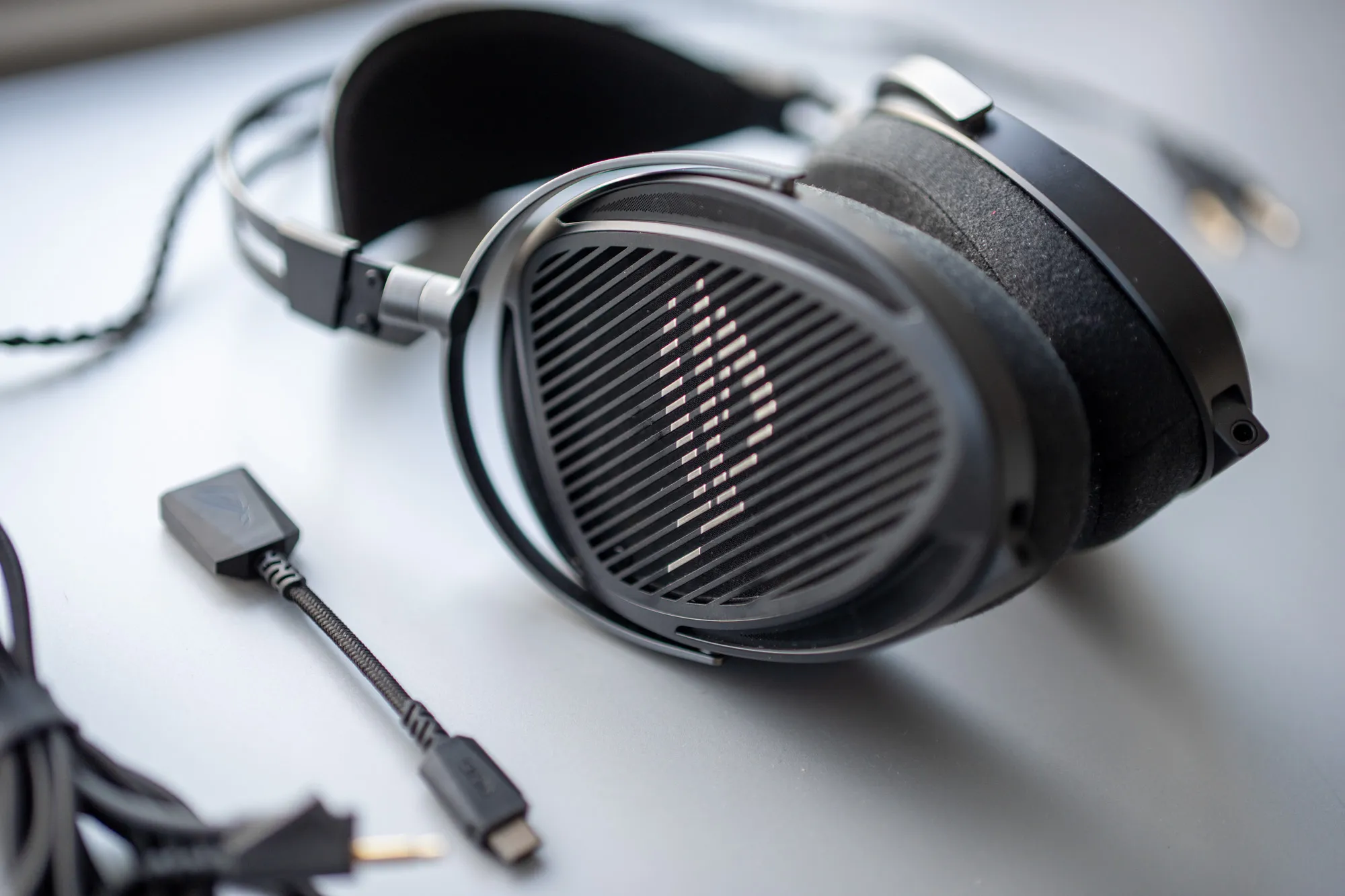 Behind the grille with the ROG eye sits the 100 mm planar driver. / Credit: kaytomas.com
The headset is open, weighs 420 grams and has a metal headband with eight steps. Pads in both faux leather and velour are included.
Plug and play with USB-C
Since I’m coming from an external sound card, the Roland Bridgecast, which is… complex to get working the way you want, it’s EXTREMELY nice to just plug in USB-C with the Kithara and then disable all other audio devices in Windows. Easy peasy! Plug and play the way it was meant to work. It works in Discord, it works in Windows in all apps. I dig it.
I still have two small annoyances. The first is the name. The adapter shows up as “USB-C Audio Adapter”, not as ASUS ROG Kithara. You can rename it yourself, but then you have to do it on every operating system. The right name in the firmware would have made it easier to recognise and would simply have been better.
Another annoyance I discovered early on was that when I turned up the volume in macOS, the sound didn’t get louder on the headset. According to the documentation this could happen and was down to a driver update. I did nothing about it, and the next time I plugged it in the problem was gone.
There’s also a volume control on the cable with the microphone, which can be used too. It ends up right by your chest when you wear the headset.
Can be driven from an iPod nano!
What’s fascinating here is that this is a big and expensive hifi headset with 10 centimetre planar drivers, and I can get good sound from an iPod nano. That in itself is quite incredible. Usually headsets in this price class are much more demanding to drive.
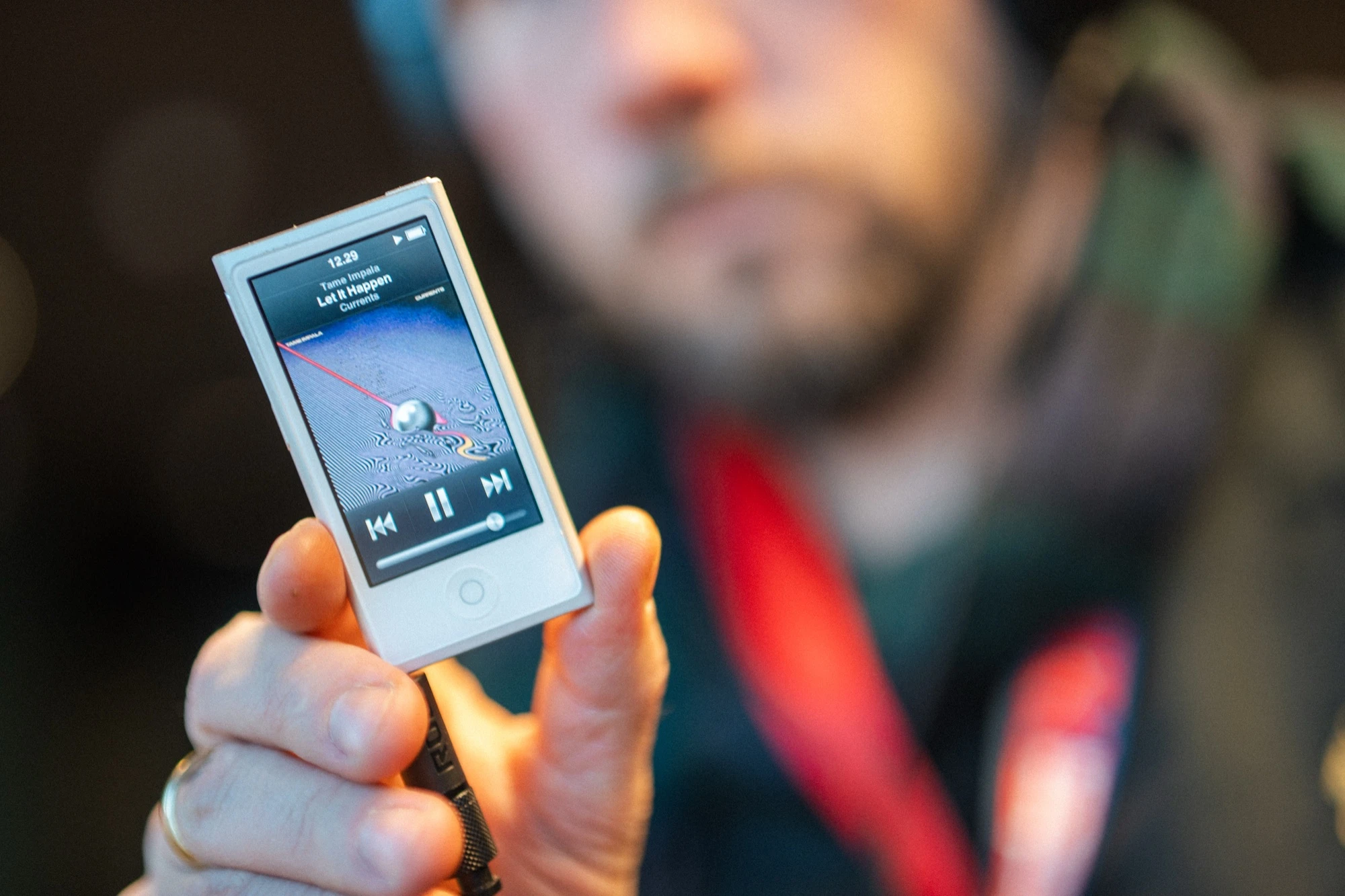

The Kithara plugged straight into an old iPod nano, with no amplifier in between. 16 ohms is enough for it to play loud enough. / Credit: kaytomas.com
The Kithara has an impedance of 16 ohms. I’ve tested it on the 3.5 mm output on the Mac and on the iPod nano, which is very weak, or assumed to be very weak. It plays as loud as I need it to, and I don’t miss any punch on either of them. From the 3.5 mm output on a MacBook Pro the sound gets louder than with the USB-C adapter, and loud enough that I’m past a volume I find comfortable. Maybe useful on a Widerøe flight (Norwegian regional airline), but too much for a quiet open-plan office.
The same goes for the USB-C adapter. There I can max out the volume in the OS and have it fairly high on the volume control on the cable. It goes up to a volume above what I use, but I was nudging up against max when I did my music test. For those who really like it loud, the adapter may be a bit too weak.
The advantage of open headsets
The difference between closed and open headsets is that open ones are supposed to give more separation in the sound, while letting in more of the sound around you. They also let out more sound to the surroundings, which can be a nuisance at very high volume in, for example, an open-plan office.
But for gaming, open headsets give you a wider soundstage on paper, so that positional cues and placing enemies get easier.
Suits music just as well as gaming
We always hear, but we don’t always listen. So to test something as subjective as sound, I’ve sat down in a dark room with my eyes closed and just… listened. Listened to the music. Tried to identify things and nuances in the music that I haven’t heard before.
When I really sit down and listen, the first thing I notice is that the separation is insanely good. By separation I mean that I can sometimes hear where the instruments and the voices are placed in the sound. I hear things in the music I haven’t noticed before, especially in the stereo image. On The Less I Know the Better by Tame Impala I hear sounds in the left channel at the start that I at least haven’t noticed earlier.
The bass is lovely and powerful. On Neverender by Justice and Tame Impala the bass that comes in is perfectly tuned and vibrates my eardrums with perfection. It’s more prominent, and I like that.
Who else is ready for GTA 6? Not me, sadly, I’m on PC. But the songs I can listen to, and this song is siiick! I move on to Flowers in a Hurricane. Damn, when the drums come in there. It’s completely epic. After 34 seconds, when the riff comes, I hear it move from right to left. The drums have a lovely room reverb. Kevin Parker’s voice is dreamy, as always. Insanely lovely sound.
On Brightsider by Dagny I get goosebumps, and I believe I can hear her lean in towards the microphone about 2 minutes and 17 seconds in.
In games I’ve used it a lot in Arc Raiders. The game has a very big and open soundstage, where it’s easy to hear the direction of enemies on the map. With the Kithara on my head I’ve sometimes done solo rounds where I’ve “hunted” other people, using only the sounds they make (by hunting I mean running over to them and shouting “Hello, Raider”). And it actually works!
Comparison with the DT 990
To have something to hold it up against, I tested the Kithara one on one with the Beyerdynamic DT 990 Pro. It’s also an open headset, a studio headset meant for good positioning, a wide soundstage and clinical sound. Both were connected to the Bridgecast.
On first listen I think the sound is quite similar. When I go from the Kithara to the DT 990 and back, it’s as if there’s a bit more punch in the sound on the Kithara, and I like the bass better. On Flowers in a Hurricane it’s hard for me to hear differences, but the drums don’t have the same punch with the DT 990. The stereo positioning is just as good. The DT 990 is very good too.
My DT 990 Pro is 250 ohms, while the Kithara is 16. On the same sound card and the same volume the Kithara therefore plays louder, and that can explain some of the punch I hear.
I have to point out that I’m not an audiophile. I’d say we’re moving towards nuances my ears will struggle to pick up.
More power gives better sound
When I switch from the Bridgecast back to the USB-C adapter, I maybe notice that there’s a bit less power in the sound. Especially at the start of Flowers in a Hurricane it’s as if a bit of punch is missing, even with max volume in Windows and max on the adapter.
But that said, this is at a much higher volume than I otherwise listen at. If I’d had it that loud in-game, I wouldn’t have been able to hear my friends talk, or anything happening in the house. It’s a whole lot of sound, and the sound quality is insanely lovely.
There’s also a compromise here. You can’t use the thicker jacks, 4.4 mm and 6.3 mm, at the same time as you use the microphone. If you’re going to use an external sound card, you have to switch cables, and then you lose the option of using the microphone that comes with it.
That means the Kithara is made for several types of users: those who want audiophile quality with a microphone, and those who have another microphone and a mixer set up. It’s a compromise I like, and I think most people can live with it. If you get an external sound card later, with for example an XLR mic, you just use the other Kithara cable and maybe get even better sound quality on both mic and headset. So the headset can live with you for years, and gets better as you change your setup.
I don’t know if everyone does this, but I change things all the time, do research and flirt with different products. The DT 990s, for example, have been connected to 4 different sound cards in the time I’ve owned them.
The microphone
I checked with my friends. Very unscientific, but I asked if they noticed anything new about my microphone. If anything, it was maybe a bit better than it usually is, they said. Normally I use a Rode Procaster, an XLR microphone, through the Bridgecast. That doesn’t mean the Kithara microphone is better, but maybe that the chain is simpler.
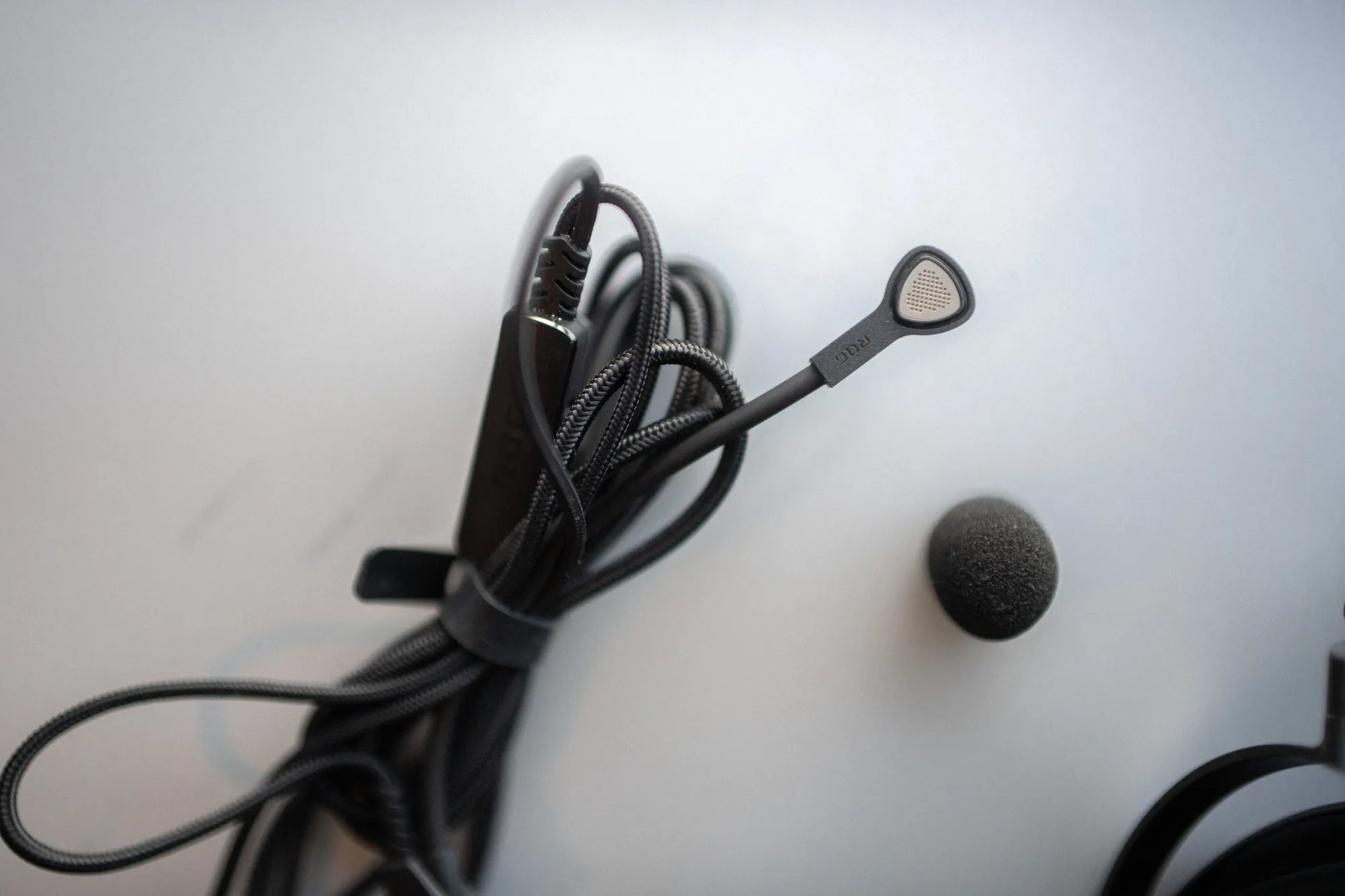 The detachable microphone, here with the windscreen taken off. / Credit: kaytomas.com
Later I’ve had feedback that I’m quieter than usual, which may be because the position of the mic changes every time I take the headset off and put it on the desk, or take a sip of a brown, refreshing beverage from a can on the desk. Unless I drink with a straw, a can will bump into the mic, and so risk pushing it a bit out of position.
When I listen to myself in recordings, my voice comes across as a bit nasal. It’s also a bit tricky to find the microphone’s ideal position in front of the mouth, even though the manual says five centimetres from the mouth.
My breathing sounds come through. If I have the mic further up it gets hit by nose breath (#nosebreath), if I have the mic further down and breathe with my mouth it also gets hit by a bit of air when I exhale. The closer to the mouth, the better the sound, but then the breathing gets picked up too.
In Discord I’ve run everything on custom with everything off. No Krisp, no noise suppression and no automatic adjustment of input sensitivity. Me being quieter may also be because I can normally boost gain and compression on the XLR microphone.
I’ll sum up by saying the sound is good enough for talking. The problem of finding the right position applies to every headset with an attached boom microphone, and for that matter to all other microphones.
Sits high on the head
The headband design has two bands over the head, and that makes the headset sit very high on the head. It’s almost meme-worthy on video. You don’t look that cool with it on, at least I don’t. It doesn’t matter much, but if you want to look cool on stream, for example, it’s something to think about. In return it takes the weight off your head very well, and it’s comfortable to use over longer periods.
I’ve used it about half the time with the velour pads and half the time with the faux leather pads. Velour is clearly what I like best, simply because it gets less clammy and I prefer the soft feel. I’m guessing this is a matter of taste from person to person, and ASUS deserves kudos for putting both pads in the box. My experience is that the clamping force eases off over time, and I’m not worried about this getting uncomfortable in the long run. I rather think it gets better as it shapes itself to your skull.
The Kithara is open, and it leaks sound. That’s to be expected of open headsets, and it goes for the DT 990 Pro too. But it’s not a nuisance unless you play very loud and other people are sitting right next to you while you game.
The Kithara is also wired only, so if you want to go to the toilet or fetch a cup of coffee with the headset on, this is the wrong choice.
You can keep the Kithara for a long time
So, is it good? Yes. I like this headset very much. It sounds lovely, it’s very solid and extremely flexible in how you can use it and in what you get in the box.
Is it worth it then, with a price up towards 3500 NOK? Well, that’s harder to answer. For one thing, people’s perception of sound differs, and we have different demands. Do you want something that lasts for years, or do you just want something that works here and now? How many hours a day do you plan to use it? The price also moves around. During Black Friday I’ve seen it down at around 2500 NOK, so check today’s price on Prisjakt, the Norwegian price comparison site.
What I can answer is whether I would have bought it myself, and yes, I would. I would gladly have saved up and bought the ASUS ROG Kithara to have a headset that could stay with me for a long time, on different devices, in the years ahead.
Measured against the DT 990 Pro, the differences in sound are fairly small nuances, but I’d say I like the sound of the Kithara best. You’re also paying for the rest of the package: detachable cables, lots of extra gear.
The flexibility you get is just wonderful. The USB-C adapter is a place to start for everyone, with one cable and zero troubleshooting. If you want a dedicated sound card with its own microphone later, well, then you keep the headset (and get more punch) and it can keep growing with you as you change your setup or keep exploring.
I’ve gone a few rounds with the score. What speaks against a six is the full price. Would I have bought this myself at full price? Probably yes. Even when I still have the DT 990 lying ready? Still probably yes. The only thing that bothers me is the full price of 3500 NOK. But, as with most other things, stuff is expensive, and I would seriously consider this as my next headset. The last thing that can speak against it is the ROG branding and the aesthetics. I don’t know if that’s for everyone, myself included, but I would STILL probably buy this myself. And that, my friend, is the clearest recommendation I can give.
Disclaimer
ASUS sent me the ROG Kithara for testing, and I expect it will be sent back there when I’m done with it. This fact affects neither the content, the text, any video, the publishing time nor anything else whatsoever.
