
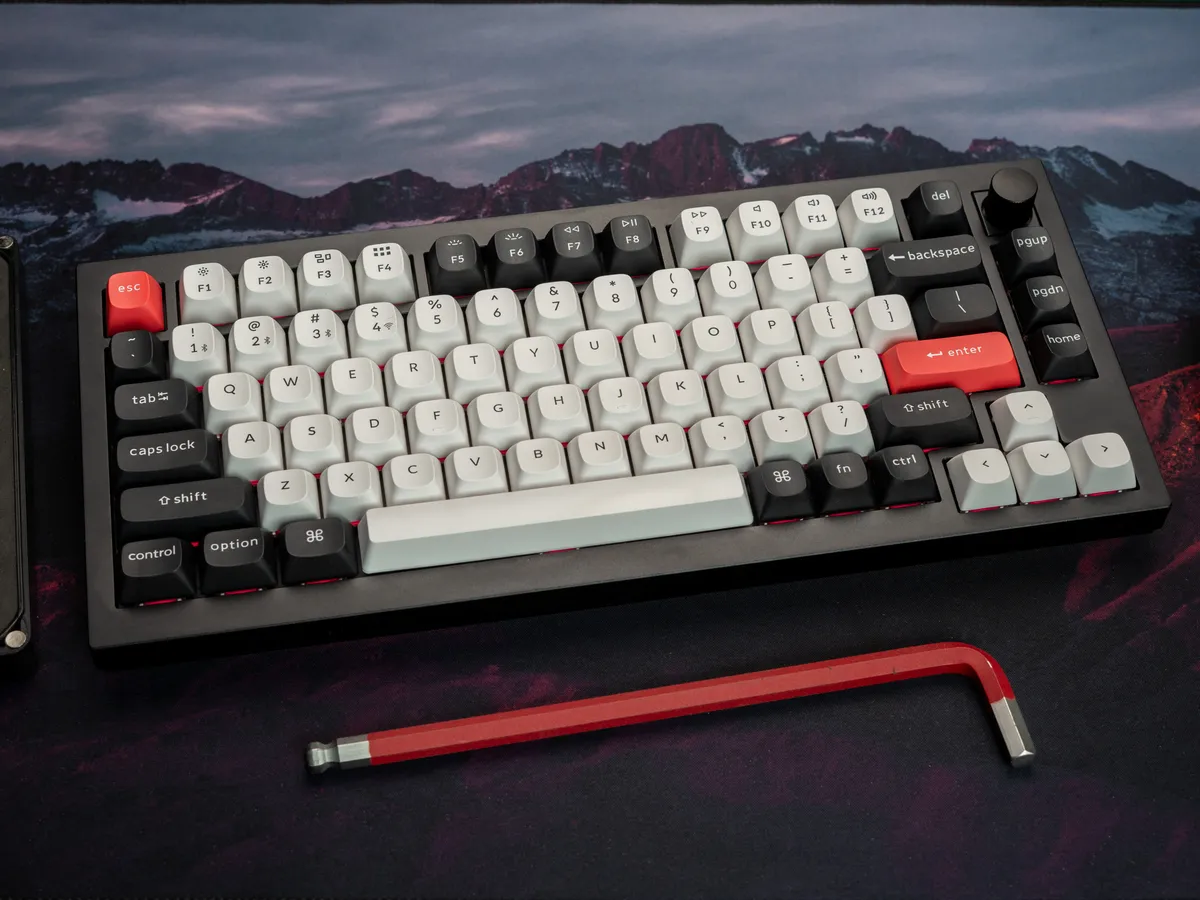
It oozes quality
I’ve tested a fair few keyboards by now, and still the Keychron Q1 HE manages to make a solid impression the moment I open the box. It’s heavy and weighs 1731 grams on my coffee scale. You feel that the moment you pick it up.
The keycaps are also good and comfortable, the keyboard is beautiful, and the whole thing screams top quality.
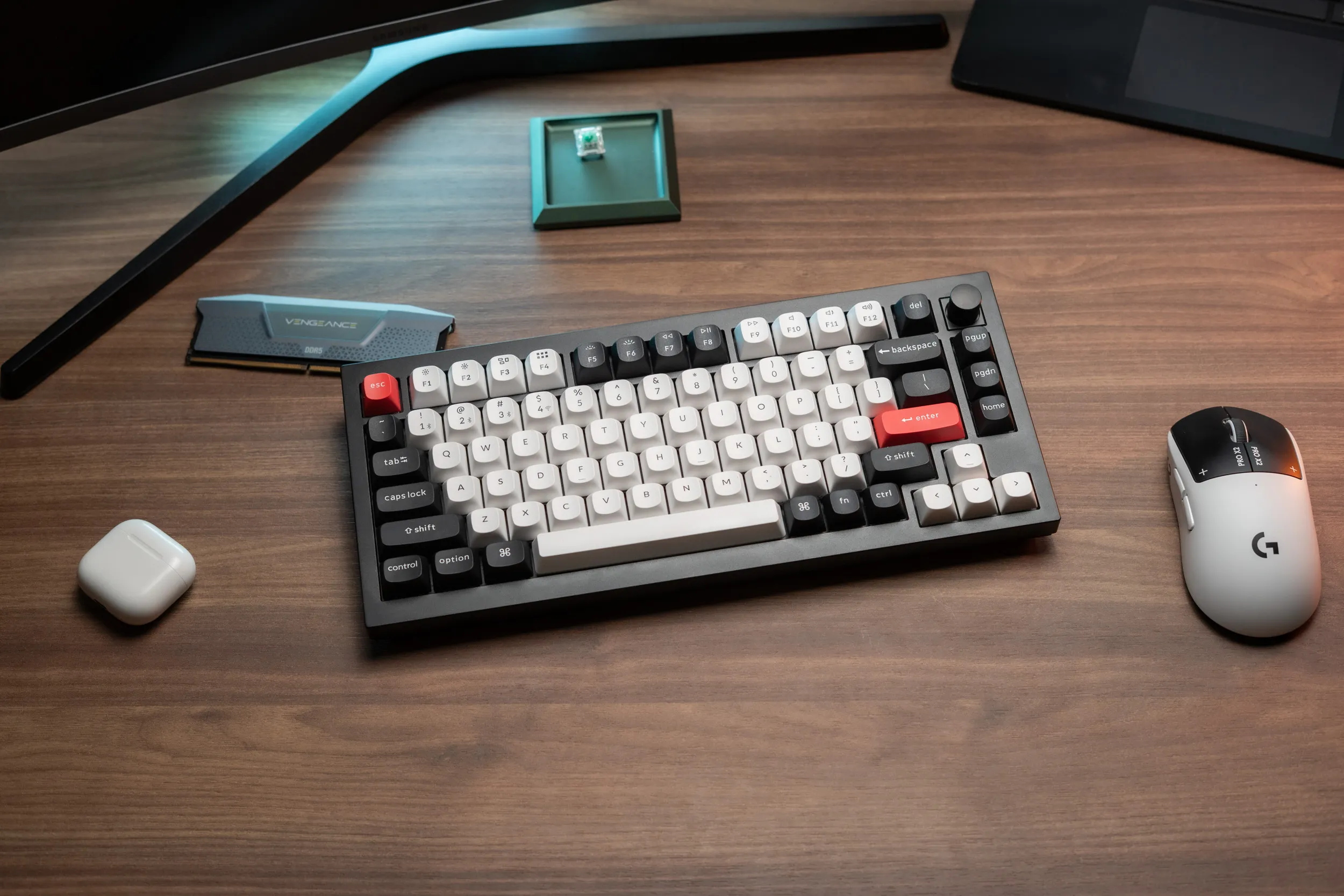 Lovely for both eyes and fingers | Credit kaytomas.com
Flipping the keyboard over, I count eight torx screws under the bottom plate, and at the back left sit the switches for connection mode and OS, along with the USB-C port. All of this, combined with the aluminium body and the gasket-mounted design, makes this feel like a proper premium product before I’ve even pressed a single key.
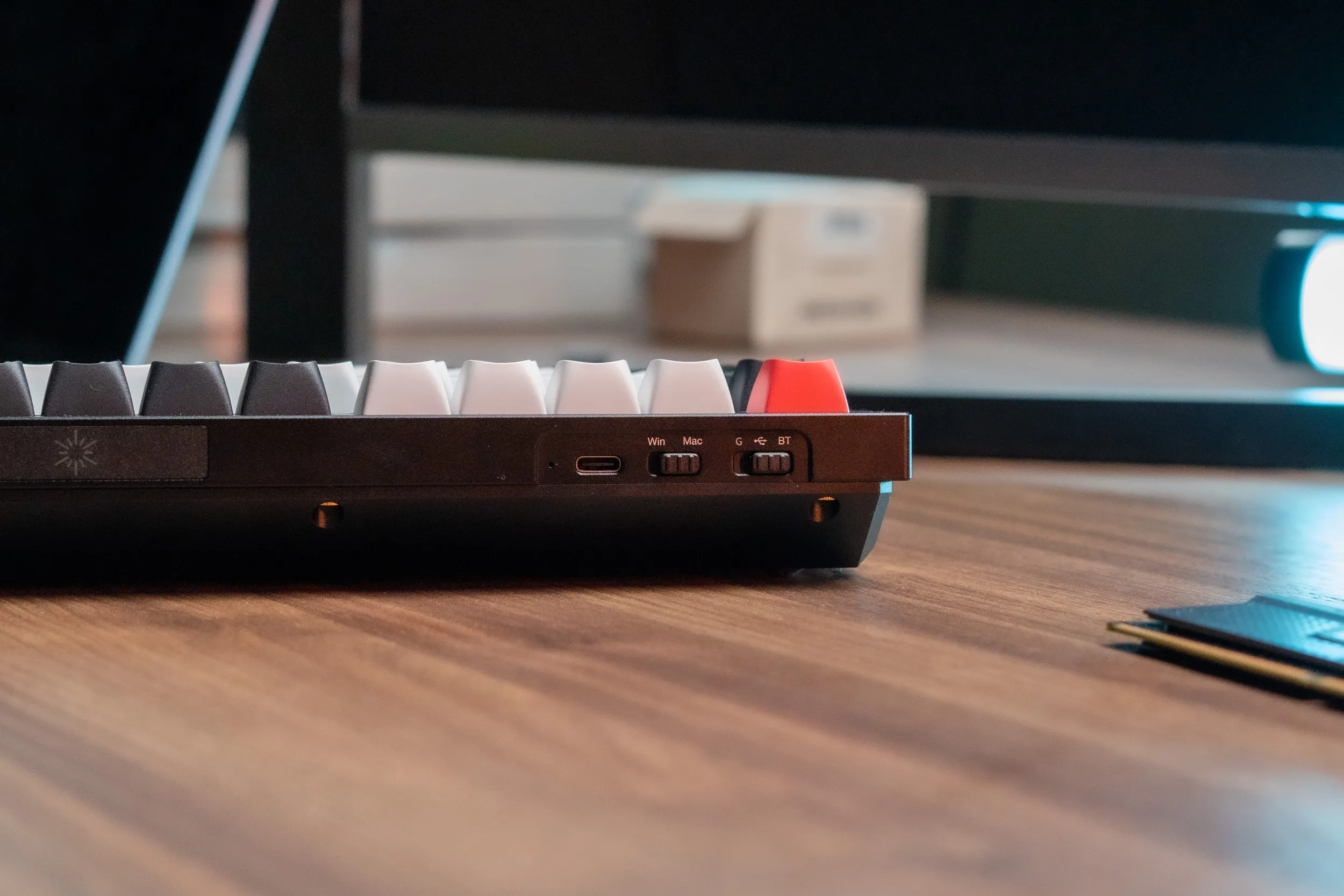 Back left: the USB-C port and the switches for OS and connection mode. | Credit kaytomas.com
What’s in the box
In the box I find a quick start guide, a braided USB-C to C cable with a USB-A adapter, extra keycaps for Mac and Windows, a keycap and switch puller, a small blue screwdriver, some spare screws and an extra adapter for the 2.4 GHz receiver. Familiar kit if you’ve bought a premium keyboard before.
It pleases me greatly that adapters are included in the box, so the keyboard can be connected whether your machine has USB-A or USB-C. Exactly how it should be in 2026!
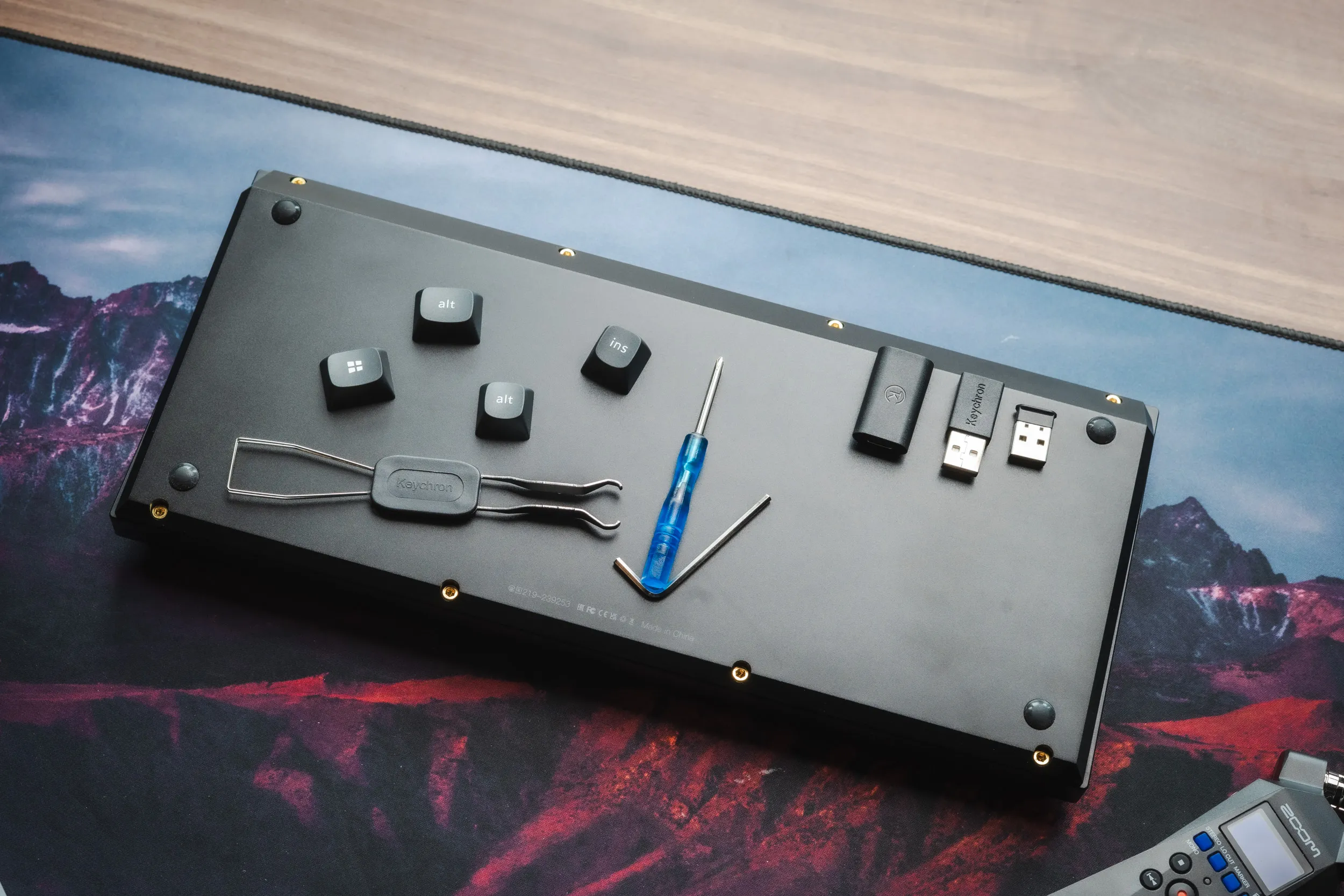 The underside and everything included in the box | Credit kaytomas.com
Magical typing feel
And the typing feel strikes me immediately as I type my first words on this. I simply love it.
The sound is lovely and pleasant, and I hear no scraping or rattle anywhere, on big keys or small, and after a long review period they still hold up. A lot of the credit probably goes to the OSA profile double-shot PBT keycaps. It’s not a completely standard profile, but I like it a lot, and they are extremely comfortable to hammer away on over long writing sessions.
In the start of the review period I only used Bluetooth, and pairing is done easily via Fn+1. At this point I hadn’t touched Keychron Launcher at all, so I was running everything at default. Even then it felt almost like typing on a typewriter. My fingers fly across the keyboard without any trouble, and with very few typos.
I’ve used it connected to my Mac for regular office work throughout the whole test period, and it’s one of the most comfortable keyboard experiences I’ve had for exactly that purpose.
The keyboard remembers up to three Bluetooth devices, by the way, which you switch between with Fn+1, 2 and 3. Note that Bluetooth polls at 90 Hz, versus 1000 Hz wired and on 2.4 GHz. For typing I notice no difference, but for gaming you should pick the cable or the dongle.
Sound test with lovely typing sound
If you’ve made it this far and want to tell me that sound descriptions like “lovely” and “satisfying” aren’t descriptive enough, then I challenge you, dear reader, to describe the sound of plastic keys hitting a keyboard with magnetic switches and several layers of dampening material yourself. Personally, I simply lack the vocabulary, and the brain abilities, to describe a beautiful sound with my mere words.
But, I can do something better. I can show you, or show your ears that is. In the clip below, the sound is recorded with a Zoom H1 and normalised in DaVinci.
Typing and sound test of the Keychron Q1 HE. | Credit kaytomas.com
Just want to hear the sound? You can play right here.
For both gaming and typing
The Q1 HE is a very good option both for those who want gamer features and for those who just type a lot.
The switches are the Gateron Nebula Linear switches (Q1H-M1), which I am very happy with. They come pre-lubed from the factory, have a dual rail design on the stem that reduces wobble, an initial force of 40 g and 60 g at the bottom, and are read by per-key Hall Effect sensors.
That gives you the full HE package I expect from a keyboard in this class: adjustable actuation point from 0.2 to 3.8 mm, Rapid Trigger and SOCD handling. Rapid Trigger means the key resets the moment you release it, instead of at a fixed point, and SOCD handling decides what happens when you hold two opposing keys at the same time, like A and D. The keyboard also supports analog input, where for example WASD can emulate the sticks on a gamepad. All the features required of a modern gaming keyboard. Worth noting though, some games, like CS2, count SOCD as cheating, so check the rules before you switch it on.
I haven’t spent the test period fine-tuning the actuation point key by key and measuring the competitive advantage in FPS games. Since my primary use is typing, I usually set the actuation point to 2 mm anyway, exactly where the default sits.
And what strikes me instead is how well the keyboard works with no adjustment at all. The HE features are there, ready to use, and make the Q1 HE fit the gamer who wants to tune every single detail just as well as people like me, who mostly just want to type a lot, and fast.
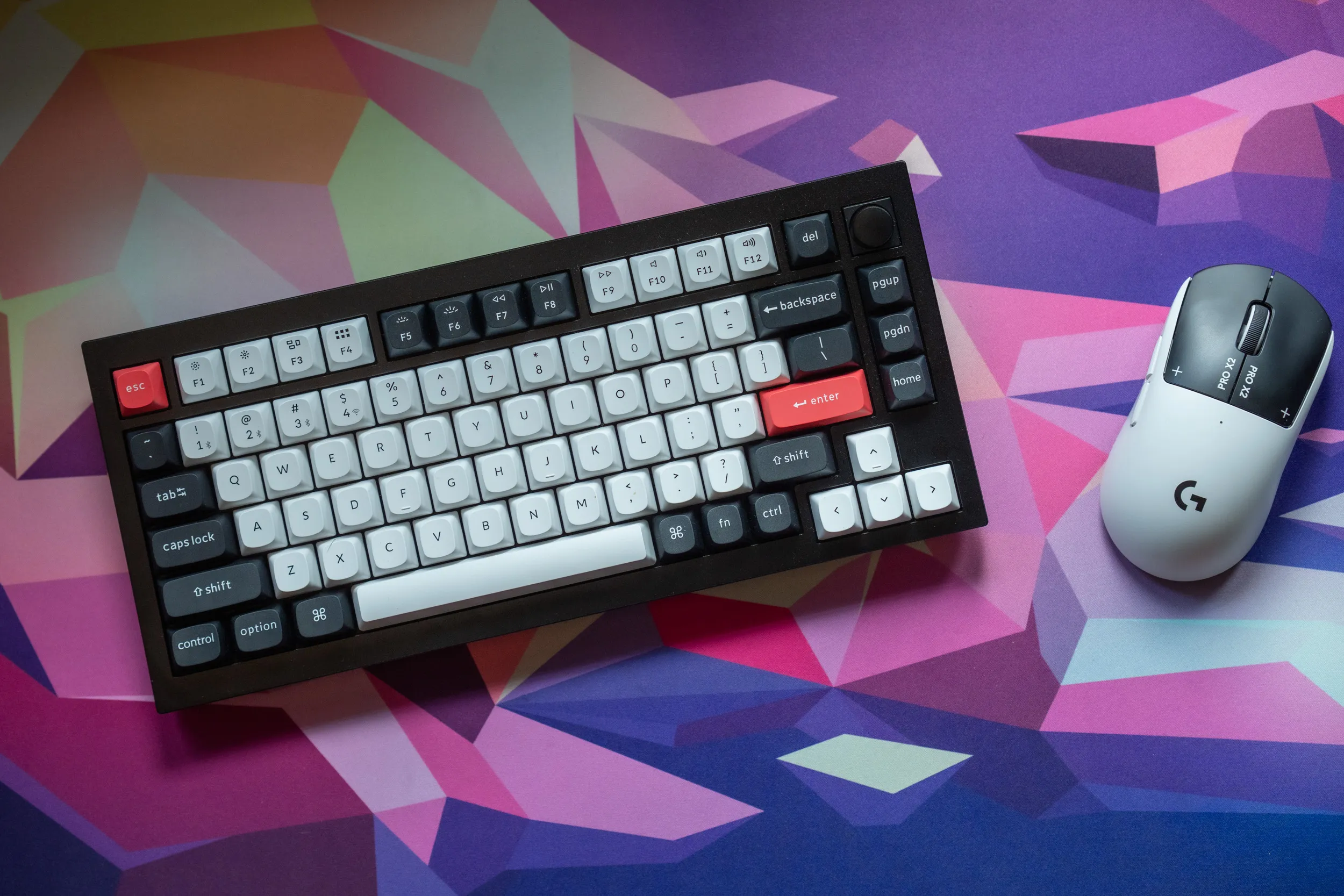 The Keychron Q1 HE straight out of the box, ready for the test period. | Credit kaytomas.com
The knob and smart solutions
The knob on top works out of the box for volume up and down, with a press for mute. If you want to change this, it’s done in Keychron Launcher. Additional actions can be added by using the Fn key and the knob for adding more layers. It’s very easy to add more functions on deeper layers here, so it works well.
The RGB is nice, if quite rainbow-heavy straight out of the box, which is trivial to adjust in Keychron Launcher. The keycaps aren’t translucent, so the RGB is only visible around the keys. You don’t see the colour shining up through translucent legends like on some other keyboards.
The keyboard can’t be angled either. There are no feet to flip out, the angle is fixed at 5.2 degrees with a front height of about 22.6 mm. My thumbs rest under the spacebar while typing, and I haven’t experienced this as a problem at any point in the test period. On the contrary, this slight angle is perfect for me to type a lot on. I love typing on this.
Firmware updates are nicely handled too. It can be a little confusing to figure out whether to do this in Bluetooth or 2.4 GHz mode, but the process itself was painless. I upgraded the firmware both on the knob module and on the keyboard itself, both worked on the first try, by following Keychron’s own instructions in Keychron Launcher.
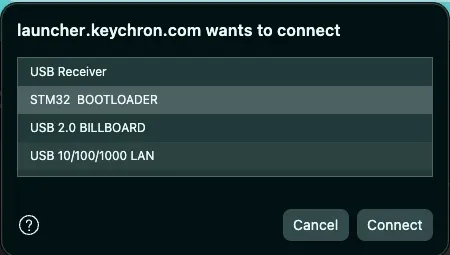 The firmware upgrade went smoothly | Credit kaytomas.com
It sounds complicated on paper. In practice you just follow the instructions, and it worked without a hitch, both times.
Battery life
Inside this thing sits a 4000 mAh battery, with a stated battery life of about 100 hours with the lights off. It’s not among the longest-lasting keyboards out there, but honestly I think it’s good enough. I’ve used the keyboard in all three modes throughout the test period: wired, on 2.4 GHz and over Bluetooth, and have not noticed any abnormal battery drain.
I especially liked how the Q1 HE warns you when the battery starts running low in wireless mode. The RGB switches off, and a red light blinks under the spacebar. It’s clear, immediate and understandable feedback without annoying notifications. A very smart and user-friendly solution.
The one thing that annoys me here is the connection mode switch itself, on the back. It lacks a clear snap between the positions, so it’s nearly impossible to feel whether you’re on Bluetooth, cable or 2.4 GHz without turning the keyboard around and looking. If you use the keyboard wirelessly, the natural routine is to flip it off at the end of each session to preserve battery for next time. It is very hard to place it in the middle position without looking, and then this little bit of fiddling quickly becomes a daily annoyance. Keychron should have spent a little extra on a switch with clear detents between the three positions.
Other Q1 variants
This 75% keyboard, the Keychron Q1 HE, comes in several versions.
| Model | Switch type | Wireless | Polling | Approx. price |
|---|---|---|---|---|
| Q1 hotswap | Mechanical (hot-swap) | No, wired only | 1000 Hz | $170 |
| Q1 HE (tested) | HE, Gateron Double Rail Magnetic | Yes, tri-mode | 1000 Hz | $190 |
| Q1 HE 8K | HE, Gateron Double Rail Magnetic | Yes, tri-mode | Up to 8000 Hz | $230 |
The version I’ve tested sits in the middle: wireless, with 1000 Hz polling over cable and 2.4 GHz. For my part I see no good reason to pay extra for 8K polling, that said, the price difference is relatively small (about $40 at the time of writing).
Availability in ISO and with Scandinavian keycaps varies a bit, and that’s exactly why I couldn’t get hold of a test unit of the 1K version with ISO and Nordic keycaps, because it is possibly out of production and taken over by the 8K version. What can you say? People want higher numbers.
Keychron also has other HE options, like the K series. It’s cheaper, and made of plastic rather than aluminium like the Q1 series, but in return you get very stylish wood elements on these. The series includes several models, and for me the K8 HE is ideal, with its good space around the arrow keys. They sell for around $130, or a little over 2000 NOK here in Norway.
Price and availability
The Q1 HE’s regular price has been around $190, which translates to about 2700 NOK here in Norway. At the time of writing it’s on sale in both places, at around $160 in the US and 2300 NOK here.
That’s not cheap, but it’s not unreasonable either for such a lovely HE keyboard with this overall quality feel.
It’s still available with ISO Nordic here in Norway, but I suspect this model, the one without 8K polling, is being phased out since it’s not available on Keychron’s own pages.
The Q1 HE 8K sells for a bit more, at $229.99, or about 2700 NOK.
The Q1 hotswap, the version without wireless and with mechanical switches, has a regular price of about $170 / 1500 NOK, and at the time of writing Norwegian retailer MaxGaming has it on sale for 850 NOK (about $85), which I think is a fantastic buy!
Configuration in Keychron Launcher
Keychron Launcher is an online configurator where you can change settings, colours, macros, HE features and the rest of your keyboard. It’s all done easily in the browser at https://launcher.keychron.com/. Super simple.
The Q1 HE doesn’t support QMK/VIA straight out of the box, but Keychron maintains its own QMK branch with Q1 HE support on GitHub. I’ll come back to the process of flashing QMK on this keyboard in a separate article.
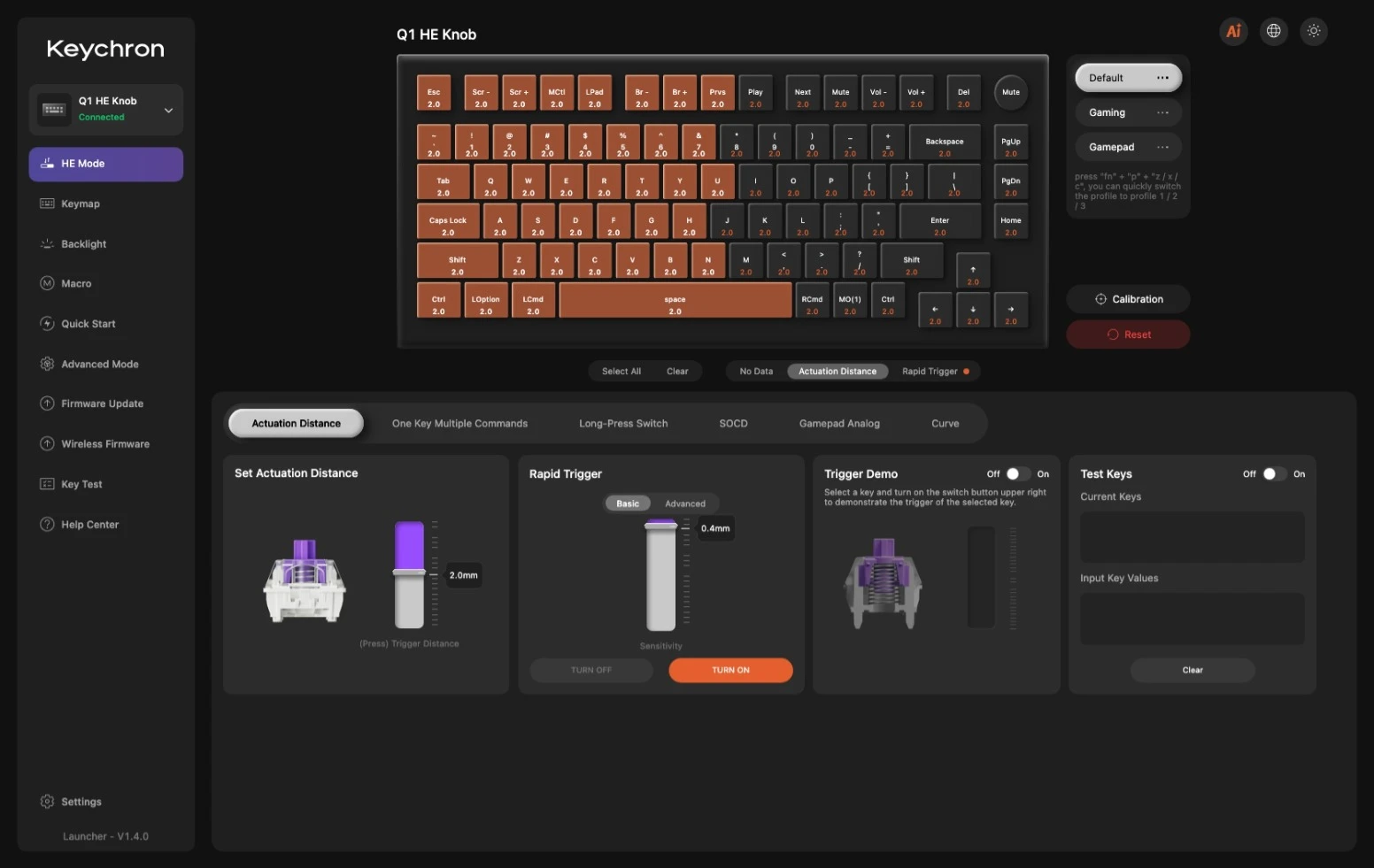
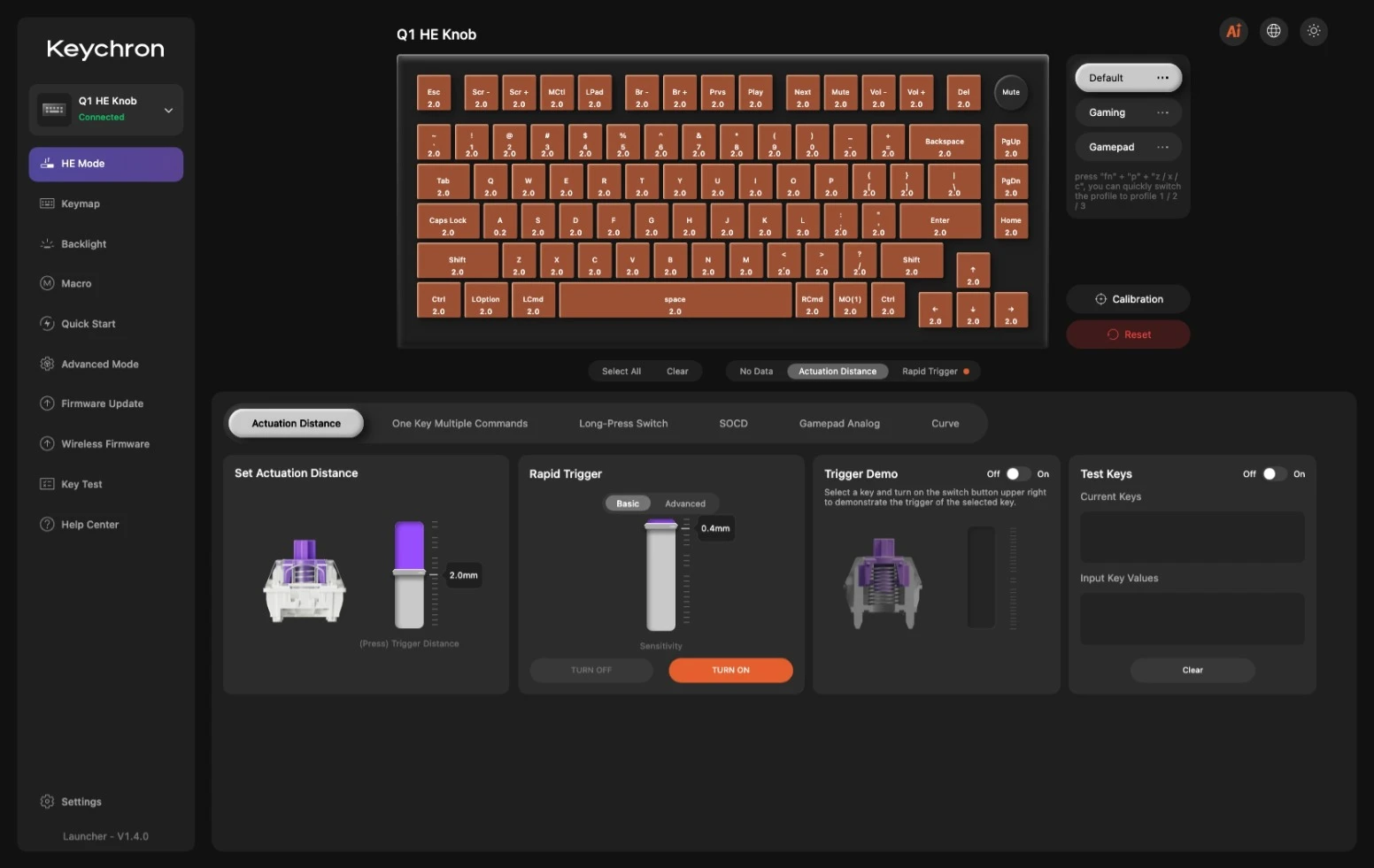
Keychron Launcher screenshots. Actuation point and Rapid Trigger | Credit kaytomas.com
The RGB is solid
Inside Keychron Launcher you get a solid selection of RGB. On several of the settings you can control brightness and speed. The LEDs themselves are south facing, meaning they’re mounted so the light points downwards. That way you see it when you’re sitting and looking down at the keyboard at 45 degrees.
The RGB on the Q1 HE in action | Credit kaytomas.com
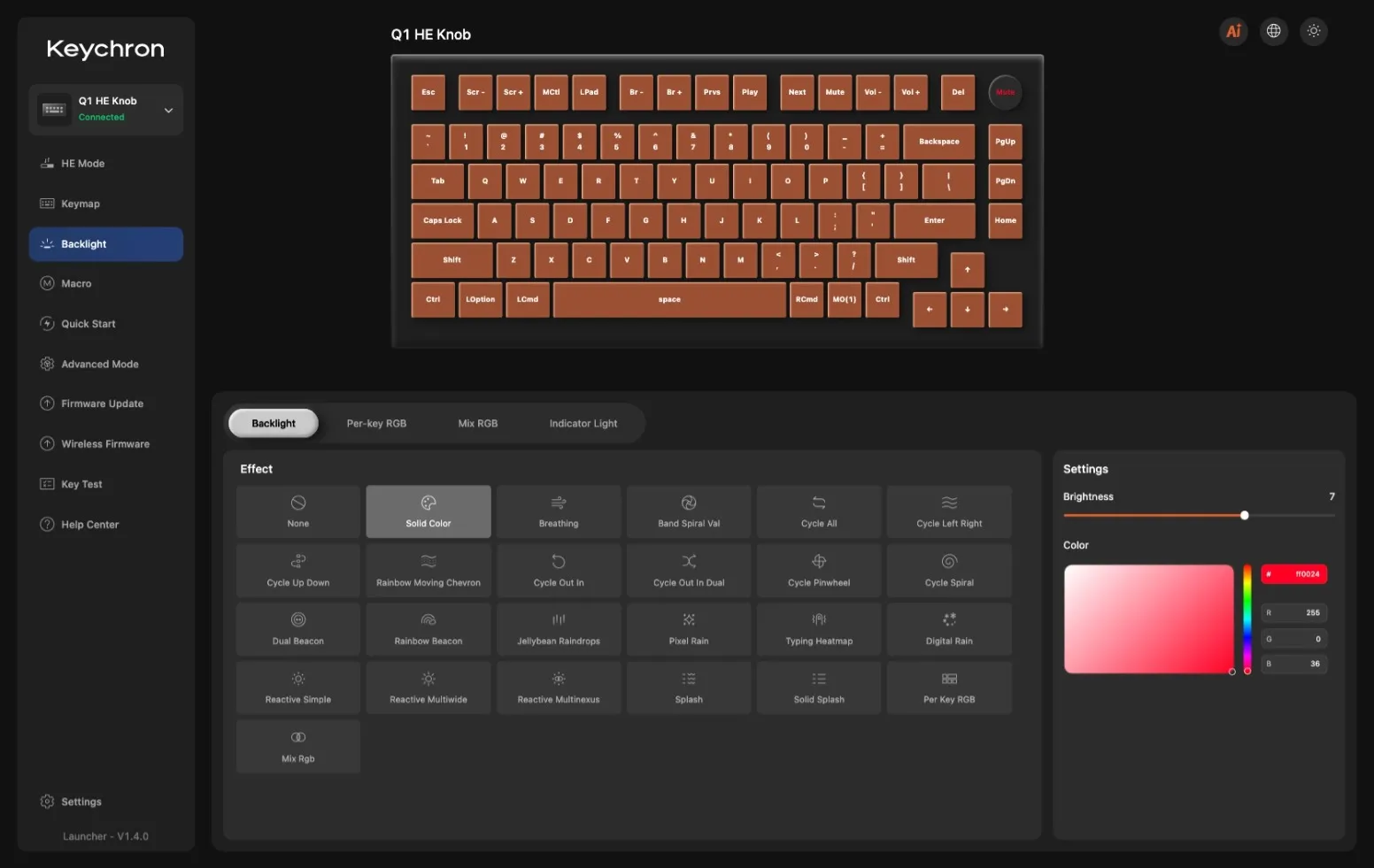 Plenty to choose from! | Credit kaytomas.com
ANSI vs ISO
I’ve tested this in ANSI, because ISO Nordic wasn’t available to me during the test period. That also means the board lacks the Nordic keys we use here in Norway (æ, ø and å).
I obviously like ISO best (I just love the traditional enter key), but I’m not reducing the ANSI score. ISO Nordic is still sold here in Norway at the time of writing, even though I suspect it’s on its way out.
On my ANSI keyboard the enter key is red, and in the press images of the ISO variant it looks like enter is black. That’s a shame, as I would have loved to see it in that lovely red colour that stands as a nice contrast to the rest of the board. Even though this is my first ANSI board, I ran into few problems with the transition in practice, after a few days of adjusting hands and muscle memory.
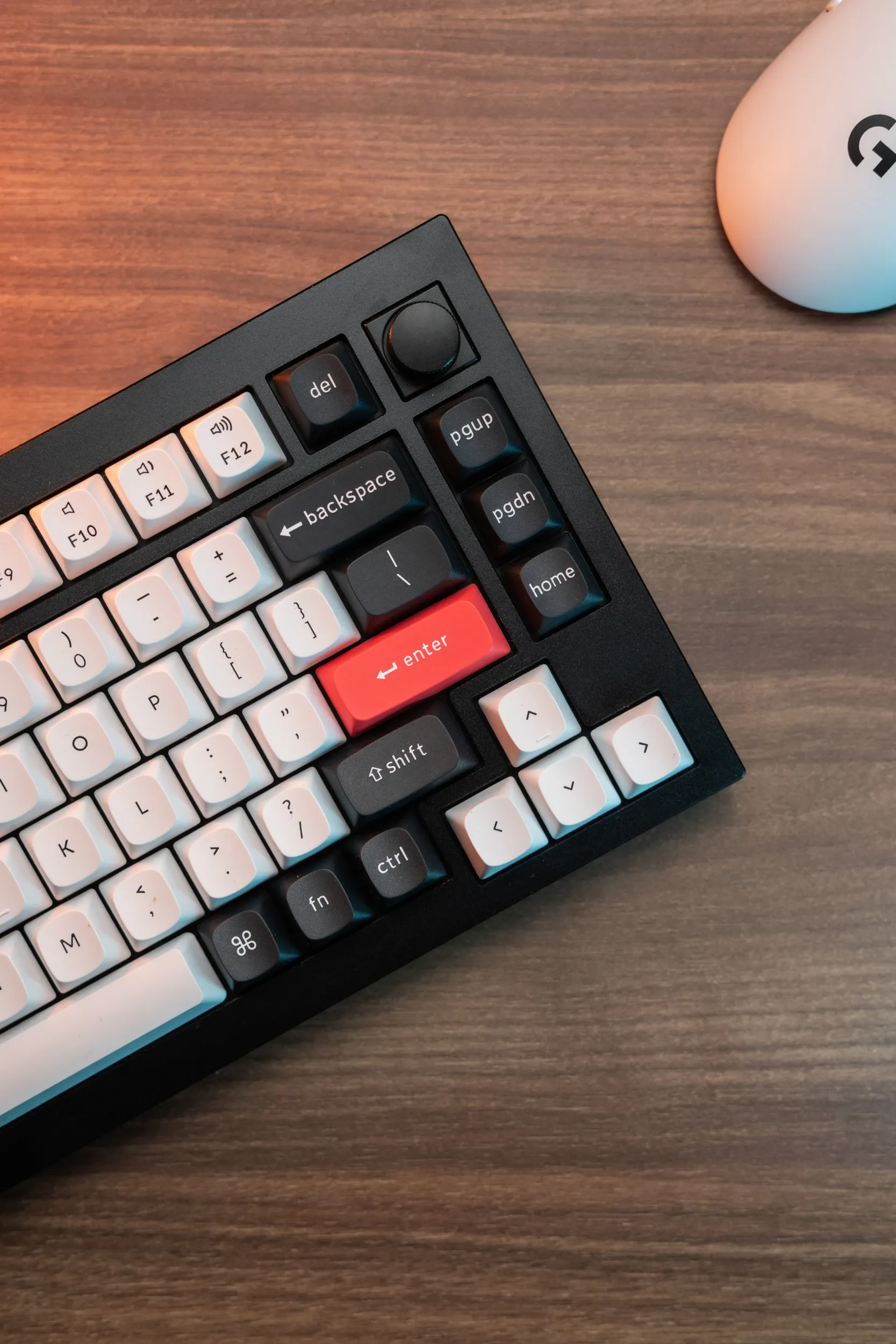 The red enter key is a lovely contrast to the rest of the board. | Credit kaytomas.com
The score, and the whole review, therefore applies to ISO Nordic too.
Conclusion
Once again, this is a keyboard that’s hard to put a score on. What really is the difference between a 5 and a 6?
If I think of the Wooting 80HE as my gold standard for keyboards, the Q1 HE is very good. They are quite similar in typing feel and sound. What separates them are the Wooting extras like the LED bar, the option of a future knob module and overall dedication to the keyboard community. Price-wise the 80HE lands at about $199.99 in plastic, roughly the same as the Q1 HE, while the Zinc version climbs north of $300 (3700 NOK here in Norway), which is significantly more expensive.
It’s honestly hard to score this, also because I don’t want my own ratings to suffer from inflation. The cons I list, like the missing feet, RGB that doesn’t shine through the keycaps and hot-swap locked to Keychron’s own switches, are mostly things I had to go looking for, not an annoyance in daily usage.
The only one that actually annoys me in daily use is the vague connection mode switch on the back, that I cannot operate without looking. That says something about how good this keyboard actually is.
I can say for certain that I would have bought this myself. As a long-lasting keyboard for the office or the gaming rig, with fantastic typing feel, perceived quality and sound.
This is a great keyboard that I think the gamer, the heavy typist, the office worker and most everyone else will be very happy with.
Disclaimer
Keychron sent me the Q1 HE for review, but they have no impact on the rating, opinions, text or images. All opinions are my own.
